Warp Bridge is a free Warp MCP server that lets an AI coding agent drive the Warp terminal on your Mac. Claude Code, Codex or Cursor can open a Warp tab in any folder, run a command in the active tab, or start another AI agent in a new tab with a task. It ships as a VS Code extension and sets itself up for Claude Code and Cursor when you install it.
I built it because I run several agents at once, each in its own Warp tab. I wanted the agent I was talking to in VS Code to open those tabs and hand out the work, instead of me doing it by hand.
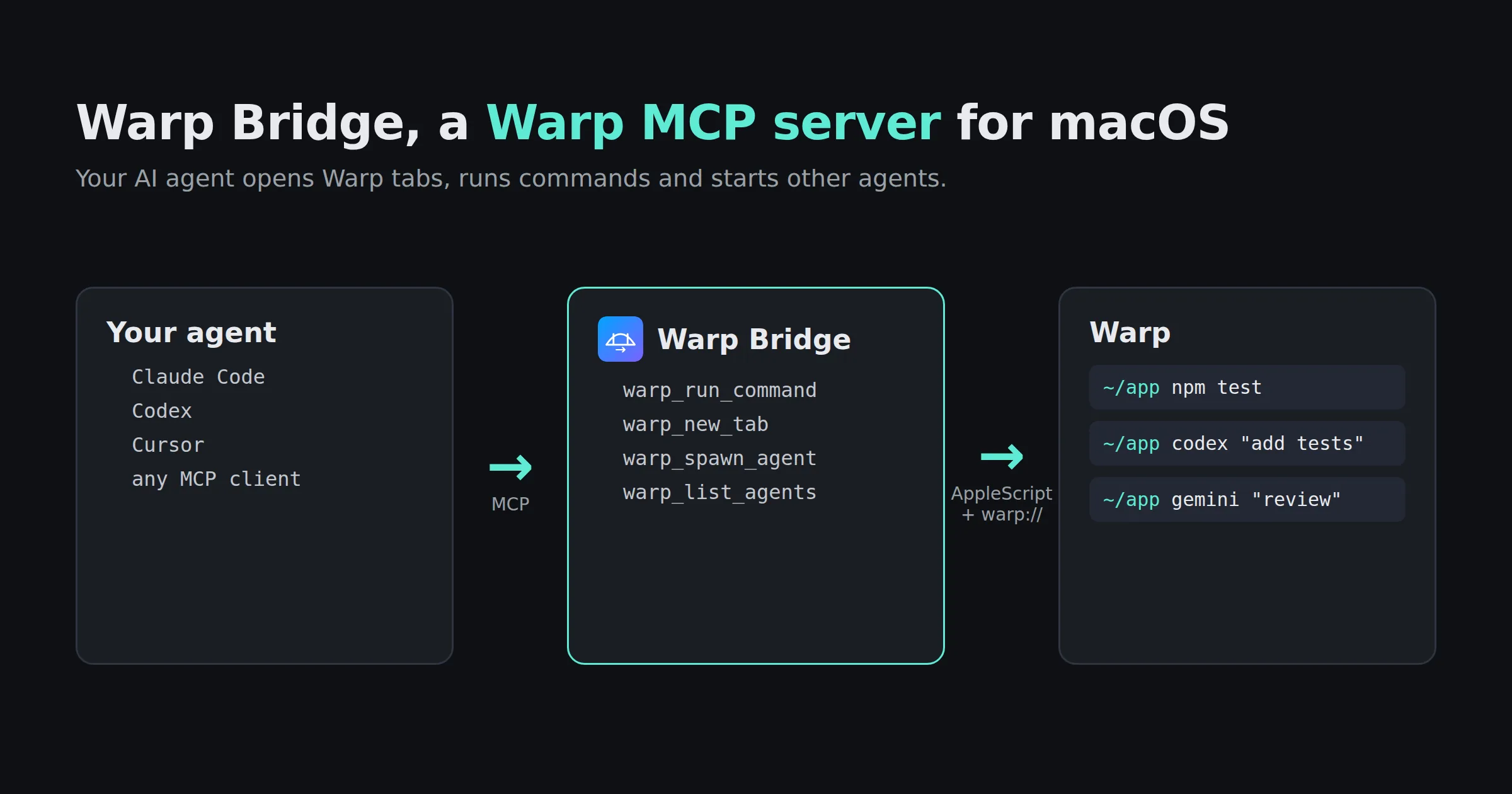
What the Warp MCP server does
Warp already runs Claude Code, Codex and other CLI agents inside its own tabs, and its built-in agent can connect to MCP servers. Warp Bridge goes the other way. It gives an agent that lives somewhere else, such as Claude Code in the VS Code terminal or the agent in Cursor, a way to reach into Warp and act there.
Ask your agent things like:
- “Open a Warp tab in this project”
- “Run the test suite in Warp”
- “Start Codex in a new Warp tab and have it write tests for the parser”
- “Start Gemini in another tab and ask it to review the README”
- “Which agents can you start?”
The four Warp MCP tools
| Tool | What it does | What you can pass |
|---|---|---|
warp_run_command |
Runs a command in the active Warp tab | The command |
warp_new_tab |
Opens a new Warp tab in a folder | A folder path (your home folder if you leave it out) |
warp_spawn_agent |
Opens a new tab and starts an AI agent there with your task | The agent (claude, codex, gemini or aider), the task, and a folder |
warp_list_agents |
Lists the agents it can start | Nothing |
To start an agent, that agent’s own command line tool has to be installed. Warp Bridge types codex "your task" into the new tab, so Codex must already work there.
How it works
New tabs open through Warp’s own URI scheme, warp://action/new_tab?path=.... That scheme can open a tab, but Warp’s documentation says it does not run a command or an agent prompt. So for commands, Warp Bridge uses AppleScript. It puts the command on the clipboard, brings Warp to the front, pastes it and presses Return.
Two things follow from that, and you should know them before you install:
- It is macOS only. AppleScript does not exist on Windows or Linux. There, the extension shows a short notice and stays off.
- It uses your clipboard and the keyboard. Whatever you had copied is replaced by the command. macOS also asks you once to let the app your agent runs in, such as VS Code, Cursor or your terminal, control your computer. You allow it under Privacy and Security, Accessibility.
The MCP server itself runs on your Mac over stdio. It makes no network calls of its own and sends nothing anywhere.
Set up the Warp MCP server
- Install Warp on your Mac.
- Install Warp Bridge from the VS Code Marketplace. You need VS Code 1.101 or newer.
- Restart Claude Code or Cursor so it reads its MCP settings again.
- Ask your agent to open a Warp tab. Allow the Accessibility prompt the first time a command runs.
You do not add a server entry by hand. On install, the extension writes its entry to ~/.claude.json for Claude Code and ~/.cursor/mcp.json for Cursor. It writes through a temporary file and a rename, so a half-written config file cannot break your other servers. Any MCP client can use it the same way, since it is a standard MCP server.
The extension also adds a Warp button to the status bar and two commands to the command palette. Open Tab in Warp opens a tab in your workspace folder, and Run Command in Warp sends one command.
Is it safe to let an agent run commands?
A command sent through Warp Bridge runs as you, with your permissions, in a real terminal. The server does not filter what it is asked to run. Your agent app is the safety check. Claude Code, Cursor and other MCP apps show the tool call and ask before they run it, unless you have told them not to. Keep those approval prompts on for warp_run_command.
Inside the server, every system call uses an argument list rather than a shell string, so the text of a command cannot break out into another command. There are no credentials or tokens in its source or settings.
Common questions
Does Warp support MCP?
Yes. Warp’s built-in agent can connect to MCP servers that you add in Warp. Warp Bridge solves a different problem. It is an MCP server that lets an agent outside Warp control Warp.
Can I use Claude Code in Warp?
Yes. Warp runs Claude Code in its tabs with agent notifications and code review. With Warp Bridge, Claude Code can also open new Warp tabs and start other agents, such as Codex or Gemini, with their own tasks.
Does Warp Bridge work on Windows or Linux?
No. It needs AppleScript, which only exists on macOS. On other systems the extension stays inactive.
Is Warp Bridge free?
Yes. It is free and MIT licensed. Warp itself has its own plans and pricing.
Why did my clipboard change?
To run a command, Warp Bridge copies it to the clipboard and pastes it into Warp. Copy your text again after a command runs.
Is this an official Warp product?
No. It is an independent extension that I build and maintain. It uses Warp’s public URI scheme and macOS scripting.
Install the Warp MCP server
Related
- Arc, the same idea for VS Code’s own terminals, with full output capture
- Iris, to talk to Claude Code from Telegram
- Warped, 19 Warp terminal color themes for VS Code
- What is an MCP server?, a plain explanation
- Google MCP servers, 20 more MCP servers I built
- All contributions