ClickSyncr is one Contact Form 7 plugin that connects your forms to email marketing and CRM platforms. Each integration is written against the platform’s real API: contacts are matched by email so re-submissions update the existing record instead of creating a duplicate, every Contact Form 7 field maps to the platform’s native fields, and an acceptance checkbox gates the sync for GDPR consent. Four integrations are published on WordPress.org today, and each has a dedicated guide on clicksyncr.com.
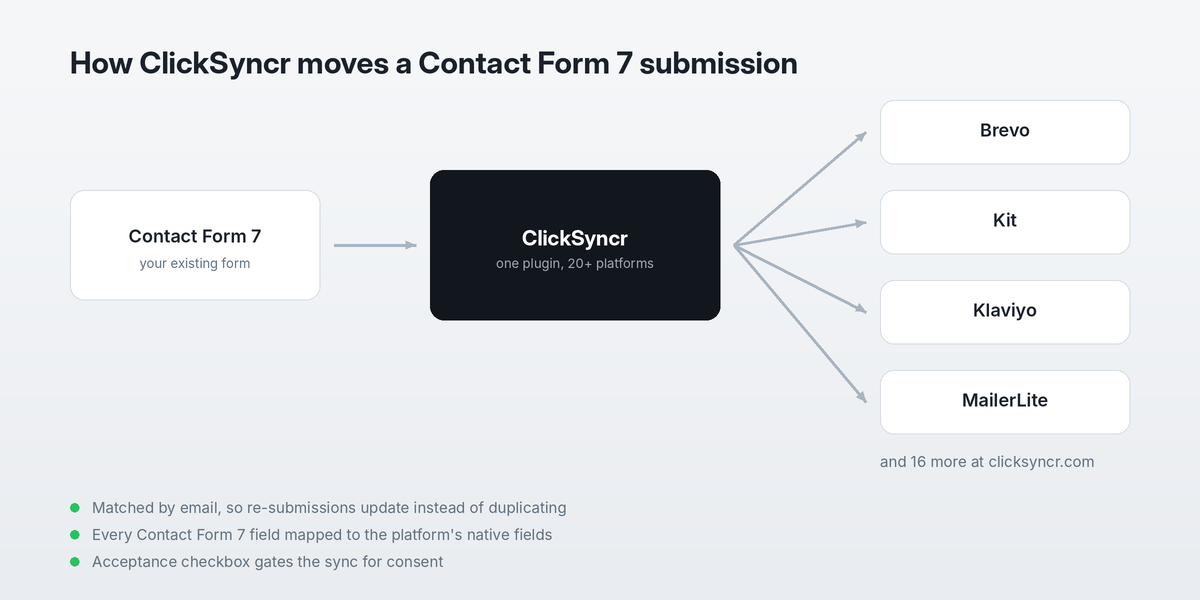
Why ClickSyncr Is One Plugin, Not Four
Most Contact Form 7 integrations ship as a separate plugin per platform. Consequently, a site that feeds two email tools carries two codebases, two settings screens and two update cycles. Each one re-implements the same field mapping and the same consent handling, and they rarely agree on how any of it should work.
This plugin takes the opposite approach. Because the form handling, field mapping and consent gate are shared, only the platform API layer changes between integrations. As a result, a fix to duplicate handling lands everywhere at once rather than four times, and the settings screen looks the same whichever platform you are sending to.
Additionally, that shared core is why re-submissions update an existing contact instead of stacking duplicates. The plugin matches on email address before deciding whether to create or update, so a visitor who fills in your form twice does not become two records.
Published ClickSyncr Integrations
Brevo
Send Contact Form 7 submissions to a Brevo list, mapped to your Brevo contact attributes.
Kit
Add Contact Form 7 subscribers to Kit (formerly ConvertKit), with your form fields mapped to Kit.
Klaviyo
Sync each Contact Form 7 submission to a Klaviyo list as a profile, with standard field mapping.
MailerLite
Send Contact Form 7 submissions to a MailerLite group, updating existing subscribers instead of duplicating them.
These plugins share one codebase and one idea: keep Contact Form 7 as your form, and let ClickSyncr deliver every submission to the marketing platform you actually use.
How ClickSyncr Came To Be
ClickSyncr grew out of a decade of building Contact Form 7 integrations. It started with the Contact Form 7 Mailchimp extension in 2015, the first plugin on WordPress.org to push CF7 submissions straight into a Mailchimp audience. Over the years that became a family of single-platform connectors: AWeber, Campaign Monitor, GetResponse, and more.
The question I kept getting was always the same: “Can it connect to the platform I actually use?” Email marketing and CRM tools had multiplied, and nobody wanted a different plugin for each one. ClickSyncr is the answer: one Contact Form 7 plugin that connects to more than 20 platforms from a single, consistent settings tab.