
A conditional Mailchimp list lets one Contact Form 7 form feed several audiences, picking the destination from something the visitor selected. Below is how to set up conditional Mailchimp list routing without duplicating the form.
If you have not connected the plugin yet, start with the Mailchimp API key and list ID guides.
Conditionally Specifying a Mailchimp destination list
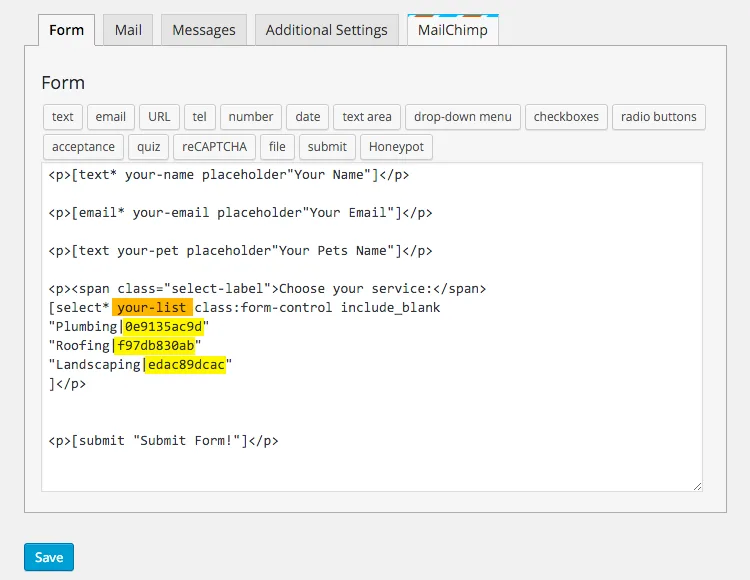
If you want to send the field values of your form to a different Mailchimp list depending in user input, in this case ‘Choose your service’, you can generate a similar form as below:
See below how we generate this form, using a [select] tag with 3 options (3 different Mailchimp lists)
- Plumbing -> List ID: 0e9135ac9d
- Roofing -> List ID: f97db830ab
- Landscaping -> List ID: edac89dcac
Below you can see how we fill the Mailchimp List ID field with the mail tag [your-list], instead of hardcoding an specific Mailchimp list ID:
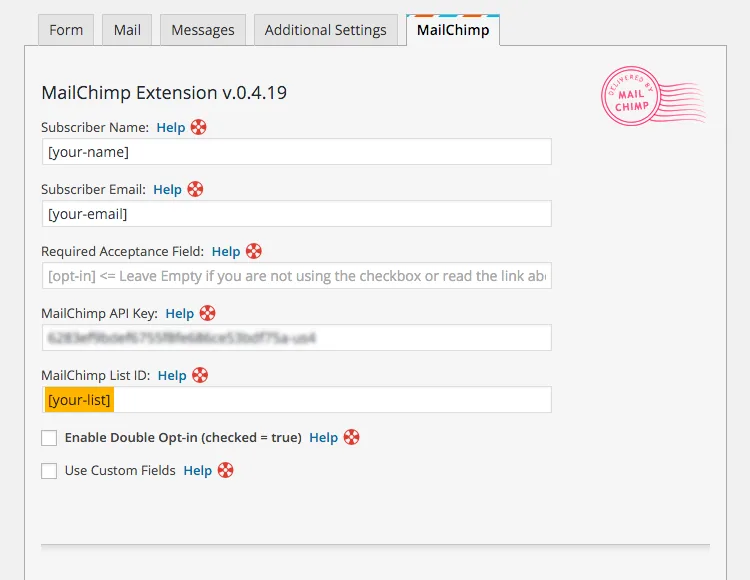
That is it!, as easy and simple as that. Test with a very basic form, so you can learn how to map your form field values the way you require them. Once you have a handle of this, you can generate forms that are more complex.
Cheers,
Renzo.